
Nonprofits face a background screening compliance environment in 2026 that is more layered than most HR teams anticipate, with updated Head Start guidance, AmeriCorps NSCHC rules, and rapidly shifting state-level youth-serving laws creating obligations that a fragmented screening process cannot reliably meet. We scored ten widely used ATS platforms across the compliance criteria that matter most to nonprofit HR and compliance staff, and the gaps we found between the strongest and weakest performers reflect real operational and legal risk, not just feature differences. If your organization screens volunteers, manages federally funded programs, or operates across multiple states, what we cover here about how these platforms actually handle FCRA workflows, adverse action records, and audit trail integrity will change how you evaluate your next ATS.
Key Takeaways
- The FCRA applies to background checks run on volunteers, not just paid employees, and most nonprofits do not fully account for this. When your organization uses a third-party consumer reporting agency to screen volunteers, the full adverse action process applies, including pre-adverse action notices, consumer report copies, and the Summary of Consumer Rights.
- The depth of a platform's screening integration determines how much compliance burden lands directly on your HR team. Platforms that rely on middleware or manual data exports break the audit trail and push the entire adverse action workflow outside the system where it cannot be reliably tracked or produced on demand.
- A broken audit trail is not just an administrative inconvenience. When screening records must be rebuilt manually during a grant review or state licensing audit, the records gaps that accumulate become direct compliance liabilities.
- No ATS platform automates full legal compliance, and nonprofits must still configure ban-the-box stage timing, lookback period filters, and individual assessment records for every jurisdiction where they operate. Selecting a well-integrated platform reduces risk but does not eliminate your organization's responsibility to verify that every workflow step reflects applicable law.
- Before signing any ATS contract, request a live demonstration of the complete adverse action workflow, including the pre-adverse action notice, consumer report copy, and Summary of Consumer Rights delivery. Do not sign until you have seen every step in that sequence demonstrated in real time.
The ATS platforms that make background screening easiest for nonprofits are those with direct links to FCRA-compliant screening providers, built-in adverse action workflow support, and volunteer-specific screening setups. In particular, nonprofits managing federal grant programs face layered rules that a broken-up screening process cannot reliably meet. This review covers ten widely used ATS platforms and ranks them on what matters most to nonprofit compliance staff in 2026.
State-level youth-serving laws tightened considerably heading into 2026. For instance, California AB 506 set tiered, required background check and mandated reporter training rules for youth-serving nonprofits, with duties that vary by role type and contact level with minors. Connecticut lawmakers pushed to extend background check mandates to license-exempt youth programs (not enacted as of publication; monitor for updates), and New Jersey proposed similar rules, creating a patchwork of state duties that nonprofit HR teams must track at the same time. Head Start background check guidance was updated in January 2026; verify current rules at eclkc.ohs.acf.hhs.gov. AmeriCorps National Service Criminal History Check (NSCHC) rules apply to every program receiving AmeriCorps funding. An ATS that cannot support these compliance workflows is not just inconvenient; it is a liability.
Note on adverse action language: Throughout this article, "confirm adverse action delivery" means verifying with your selected screening partner that the complete pre-adverse action package, including the consumer report copy and the Summary of Consumer Rights, is delivered to the candidate through the linked workflow before any adverse action is taken.
10 ATS Platforms Compared: Background Screening and Compliance
1. Greenhouse
Background Screening Integration: Greenhouse supports direct links with FCRA-compliant screening providers through its certified partner marketplace. Nonprofits can trigger screening orders from within a candidate record, track status in real time, and receive results without leaving the platform. In addition, the link model supports FCRA consent capture and connects to adverse action records workflows. Confirm adverse action delivery with your selected screening partner. For nonprofits running AmeriCorps programs or Head Start grantee work, this built-in compliance support reduces manual handoffs and strengthens the audit trail.
Nonprofit Fit: Greenhouse is widely used by mid-size to large nonprofits. Its structured hiring workflows and offer management tools suit organizations with multiple departments and separate recruiting pipelines for employees, contractors, and fellowship participants.
Key ATS Features:
- Native partner marketplace with FCRA-compliant screening provider connections
- Structured interview kits and scorecards to support consistent, defensible hiring decisions that include individual assessment records
- Role-based permissions suitable for lean nonprofit HR teams
- Configurable approval workflows for grant-funded positions
- Reporting dashboards that support audit-ready records
Limitations: Greenhouse carries a higher price point that may challenge small nonprofits. Volunteer-specific screening setups require extra work. Furthermore, nonprofits must configure ban-the-box stage timing and confirm that state-specific lookback period filters are applied at the screening provider level.
2. Zoho Recruit
Background Screening Integration: Zoho Recruit's background screening links rely mainly on third-party middleware or manual data export processes. Nonprofits must start screening through a separate portal and manually update candidate records with results, breaking the audit trail and increasing admin burden during federal grant reviews. As a result, nonprofits should require data processing agreements with all vendors in the screening data chain.
Nonprofit Fit: Zoho Recruit offers a low-cost entry point and strong online application form tools, appealing to small nonprofits managing high-volume volunteer applications. Its link within the broader Zoho ecosystem can reduce total software cost for organizations already using Zoho CRM or Zoho HR.
Key ATS Features:
- Customizable online forms for volunteer and staff intake
- Resume parsing and candidate database management
- Email automation for candidate communication
- Integration with the broader Zoho HR and CRM ecosystem
- Affordable tiered pricing for lean teams
Limitations: Background screening links require workarounds that create compliance gaps for federally funded programs. The full FCRA adverse action workflow is not surfaced inside the platform, placing the entire compliance burden on the HR team. As a result, nonprofits using Zoho Recruit for FCRA-covered screening must maintain a separate, documented adverse action process outside the platform.
3. Workday
Background Screening Integration: Workday supports links with FCRA-compliant screening providers through its certified partner ecosystem and API framework. Nonprofits can configure screening workflows by position type, align consent and adverse action steps with FCRA rules, and generate audit-ready reports from within the platform. Confirm adverse action delivery with your selected screening partner. In addition, Workday's link depth supports complex multi-entity nonprofits tracking screening across employees, contractors, and program staff at the same time.
Nonprofit Fit: Workday is best suited for large nonprofits or nonprofit networks with complex HR, finance, and compliance needs. Smaller organizations may find the platform over-built and cost-prohibitive.
Key ATS Features:
- Certified partner links with background screening providers supporting FCRA compliance steps
- Configurable screening packages by role, department, or funding source
- Full audit reporting for grant compliance records
- Integration with Workday's finance and grant management modules
- Advanced analytics for workforce compliance monitoring
Limitations: Workday's setup cost and complexity make it out of reach for most small and mid-size nonprofits. Volunteer-specific workflows are less developed than employee-focused hiring processes. Furthermore, nonprofits must configure ban-the-box stage timing and confirm that individual assessment records steps are built into the screening review process.
4. Breezy HR
Background Screening Integration: Breezy HR offers background screening through third-party connections that require setup outside the core platform. Screening status updates are not consistently shown in real time within candidate records, creating records gaps for nonprofits required to prove screening compliance to grant auditors or state licensing reviewers. With this in mind, nonprofits should assess data handling practices for all vendors in the screening data chain.
Nonprofit Fit: Breezy HR is popular with small nonprofits for its clean interface and fast setup time. Mobile-friendly design makes it useful for distributed volunteer coordinators working across multiple sites.
Key ATS Features:
- Drag-and-drop pipeline management for clear hiring workflows
- Customizable application forms for staff and volunteer positions
- Email and SMS candidate communication tools
- Job board syndication for reaching diverse applicant pools
- Third-party links via Zapier for workflow extensions
Limitations: Background screening links are not native and depend on middleware that reduces audit trail reliability. The full FCRA adverse action workflow, including the pre-adverse action notice, consumer report copy, and Summary of Consumer Rights, is not supported inside the platform. As a result, nonprofits must maintain a separate, documented adverse action process outside the platform.
5. iCIMS
Background Screening Integration: iCIMS connects to FCRA-compliant screening providers through its broad integration marketplace, allowing nonprofits to start and track background checks directly within the candidate workflow. The platform supports FCRA consent steps, adverse action records, and configurable screening packages by role type. Confirm adverse action delivery with your selected screening partner. For nonprofits running Head Start programs or AmeriCorps grants, iCIMS provides a structured compliance layer that supports audit prep without requiring manual data reconciliation.
Nonprofit Fit: iCIMS serves a broad range of nonprofit sizes and is well suited for organizations managing hiring across multiple programs, funding streams, and geographic locations at the same time.
Key ATS Features:
- Marketplace integration with certified background screening providers
- Volunteer and non-employee applicant tracking setups
- Adverse action workflow support within the candidate record
- Reporting and analytics for grant compliance records
- Configurable onboarding forms and digital document management
Limitations: iCIMS has a steeper learning curve than lighter platforms, and the cost-to-value ratio may be less favorable for smaller nonprofits at entry-level tiers. Furthermore, nonprofits must configure ban-the-box stage timing and confirm that individual assessment records steps are built into the screening review process.
6. Manatal
Background Screening Integration: Manatal does not offer native links with FCRA-compliant background screening providers. Background checks must be managed through external tools, and results are not linked to candidate records within the platform. For nonprofits subject to Head Start standards, AmeriCorps NSCHC rules, or state youth-serving laws, this gap creates significant compliance records risk. In fact, the full adverse action process must be managed entirely outside the platform, creating material exposure for FCRA violations.
Nonprofit Fit: Manatal is positioned as an AI-powered recruiting tool for staffing agencies and international hiring teams. Its feature set is not designed for U.S. nonprofit compliance workflows, volunteer management, or grant-funded program work.
Key ATS Features:
- AI-based candidate matching and scoring
- Resume parsing and talent database search
- Multi-pipeline management for different position types
- Social media candidate sourcing tools
- Basic reporting for hiring activity
Limitations: Background screening links are absent at a compliance-relevant level. U.S. nonprofit compliance workflows, including complete FCRA adverse action steps, federal grant screening rules, and state-level fair chance duties, are not prioritized in the product design.
7. BambooHR
Background Screening Integration: BambooHR supports direct connections to FCRA-compliant background screening providers through its partner link network. Nonprofits can start screening orders from within the employee or applicant record, receive status updates inside the platform, and document screening outcomes alongside other onboarding records. Confirm adverse action delivery with your selected screening partner. BambooHR's ease of use makes it especially well suited for nonprofit HR staff managing compliance without dedicated legal or compliance staff.
Nonprofit Fit: BambooHR is a strong fit for small to mid-size nonprofits. Its clean interface, onboarding checklists, and HR document management tools reduce admin overhead for lean teams, and pricing is more accessible than enterprise-tier ATS platforms.
Key ATS Features:
- Certified partner links with background screening providers, including FCRA workflow support
- Digital onboarding forms and e-signature capture
- Role-based access controls for volunteer coordinators and program managers
- Time-off tracking and HR recordkeeping in a single platform
- Reporting exports suitable for grant audit records
Limitations: BambooHR's applicant tracking features are less advanced than dedicated ATS platforms like Greenhouse or iCIMS. Volunteer-only screening setups require custom workflow setup. Furthermore, nonprofits must configure ban-the-box stage timing and ensure individual assessment records are built into the screening review process.
8. Personio
Background Screening Integration: Personio's background screening capability is limited to third-party links not native to the core platform. The full FCRA adverse action workflow is not supported within Personio's standard candidate management process, and the entire adverse action process must be handled outside the system. For nonprofits with U.S.-based compliance rules, this creates a meaningful gap in both operations and legal compliance.
Nonprofit Fit: Personio is mainly designed for European markets. U.S. nonprofit compliance rules, including FCRA duties, AmeriCorps NSCHC standards, and Head Start screening guidance, are not core use cases for the platform.
Key ATS Features:
- HR information system with built-in recruiting pipeline
- Digital document management and e-signature capability
- Onboarding workflow automation
- Customizable hiring stages
- Reporting for headcount and hiring activity
Limitations: Personio is not designed for U.S. regulatory compliance settings. Nonprofits receiving federal grants would face significant compliance records gaps using it as their primary ATS. In addition, the full FCRA adverse action process must be managed entirely outside the platform, creating substantial procedural compliance risk.
9. Rippling
Background Screening Integration: Rippling supports background screening links through its partner app ecosystem and API framework. Nonprofits can connect FCRA-compliant screening providers to Rippling's hiring and onboarding workflows, enabling screening status tracking within the candidate record and linking results to onboarding completion steps. Confirm adverse action delivery with your selected screening partner. Rippling's strength in automating compliance-related tasks, including I-9 verification, policy acknowledgment, and benefits enrollment, makes it competitive for nonprofits that want to consolidate HR compliance into a single platform.
Nonprofit Fit: Rippling suits mid-size nonprofits with tech-forward HR teams that want unified HR, IT, and compliance management. Its automation capabilities reduce manual work for organizations managing both employee and contractor compliance at the same time.
Key ATS Features:
- App ecosystem supporting certified background screening provider connections
- Automated onboarding workflows tied to screening completion status
- Role-based access and permissions for multi-department nonprofits
- I-9 and employment eligibility verification integration
- Compliance task automation for policy acknowledgment and training completion tracking
Limitations: Rippling's pricing model can escalate with additional modules, and nonprofit discount programs are not consistently publicized. Volunteer-specific screening workflows are less developed than employee-focused processes. Furthermore, nonprofits must configure ban-the-box stage timing and confirm that individual assessment records steps are built into the screening review process.
10. Freshteam
Background Screening Integration: Freshteam's background screening connections depend on manual processes or third-party middleware tools. Background check results are not built directly into candidate records in a way that supports FCRA workflow compliance. The full FCRA adverse action process must be managed entirely outside the platform, and nonprofits subject to federal grant screening rules would need a separate records system to meet audit standards.
Nonprofit Fit: Freshteam (by Freshworks) targets small to mid-size organizations seeking an affordable, entry-level ATS. The platform is accessible and easy to deploy, but its compliance tooling is limited relative to the needs of federally funded nonprofits.
Key ATS Features:
- Simple job posting and applicant pipeline management
- Basic onboarding checklists and document collection
- Integration with the broader Freshworks product ecosystem
- Affordable pricing for budget-constrained organizations
- Mobile-friendly interface for distributed teams
Limitations: Background screening links do not support FCRA workflow steps inside the platform. The entire adverse action process must be handled manually, increasing compliance risk for nonprofits using consumer reporting agencies for employee or volunteer screening.
How Do These ATS Compare? Scores and Recommendations
| ATS | Screening Integration Model | FCRA Workflow Support | Volunteer Screening Support | Audit Trail Quality | Nonprofit Usability | Total (out of 25) |
| Greenhouse | 5 | 5 | 4 | 5 | 4 | 23 |
| Zoho Recruit | 2 | 2 | 2 | 2 | 3 | 11 |
| Workday | 5 | 5 | 3 | 5 | 3 | 21 |
| Breezy HR | 2 | 2 | 2 | 2 | 4 | 12 |
| iCIMS | 5 | 4 | 4 | 4 | 4 | 21 |
| Manatal | 2 | 1 | 1 | 2 | 3 | 9 |
| BambooHR | 4 | 4 | 4 | 4 | 5 | 21 |
| Personio | 2 | 2 | 2 | 3 | 3 | 12 |
| Rippling | 4 | 4 | 3 | 4 | 4 | 19 |
| Freshteam | 2 | 2 | 2 | 2 | 3 | 11 |
Platforms with broad, certified screening partner ecosystems consistently outperform those relying on manual processes or middleware connections across every compliance-relevant criterion. The scoring gap between the top five and the bottom five reflects a real operational difference: nonprofits using well-linked platforms can produce complete screening audit trails on demand, while those using broken-up processes must rebuild records manually, often under the pressure of a grant review or state licensing audit.
Top recommendations for most nonprofits: Greenhouse, iCIMS, and BambooHR offer the strongest combination of screening link depth, volunteer screening support, and grant-audit-ready records across a range of nonprofit sizes and budgets. For larger or more structurally complex organizations, such as multi-site networks, national service programs, or nonprofits managing both healthcare delivery and workforce compliance, Workday and Rippling provide the additional infrastructure needed to manage compliance at scale.
Important: No ATS platform automates full legal compliance. Regardless of which platform is selected, nonprofits remain responsible for ensuring their screening workflows reflect applicable federal FCRA rules, state-specific adverse action rules, ban-the-box timing duties, lookback period limits, and individual assessment duties for each jurisdiction where they operate. Consult qualified legal counsel before finalizing your screening workflow setup.
How to Evaluate ATS Background Screening Integration Before You Buy
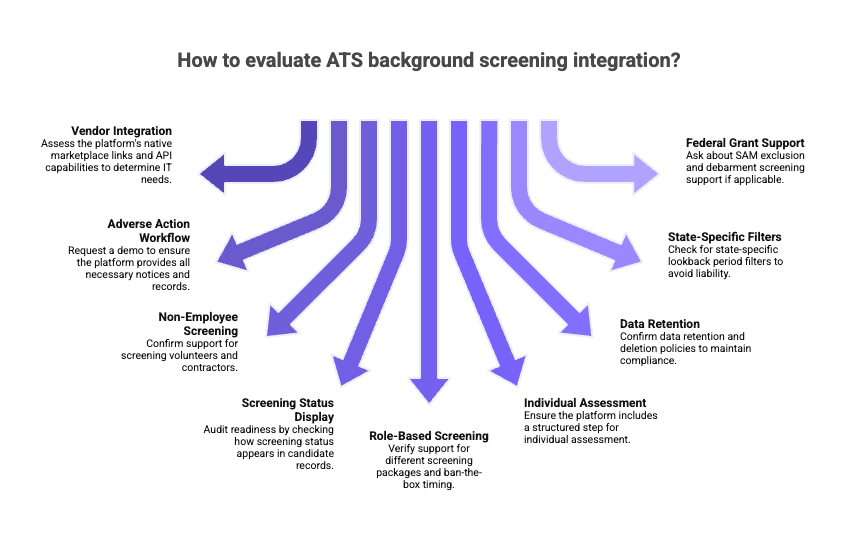
- Ask the vendor directly whether the platform has a native marketplace link with FCRA-compliant screening providers, or whether integration requires a custom API build or manual data export. The answer determines how much IT capacity your nonprofit will need to maintain compliance.
- Request a demo of the complete adverse action workflow. The pre-adverse action package must include the pre-adverse action notice, a copy of the consumer report, and a copy of the FTC/CFPB Summary of Consumer Rights, all provided to the individual before any adverse action is taken. Confirm the final adverse action notice step is also recorded within the platform. Do not sign a contract until you have seen the full sequence demonstrated.
- Confirm volunteer and contractor screening support. If the ATS only handles employee applicants, it will not serve a nonprofit that screens board members, volunteers, or recurring contractors. Ask specifically how non-employee screening records are stored, accessed, and reported.
- Ask how screening status appears in the candidate record. Audit readiness depends on a clean record showing when screening was ordered, the result, what individual assessment was conducted, and what action was taken. Ask to see this in a live demonstration.
- Check whether the platform supports role-based screening packages and ban-the-box timing. Blanket screening of every volunteer creates unnecessary cost, drives volunteer drop-off, and may conflict with role-based screening laws in states like California and Connecticut. Confirm the platform allows different screening packages by position type and that criminal history screening can be triggered only after a conditional offer has been extended.
- Confirm individual assessment workflow support. Before any adverse action is taken based on criminal history, applicable EEOC guidance and many state and local laws require a documented individual assessment. Ask whether the platform includes a structured step for this before an adverse action decision is finalized.
- Verify data retention and deletion policies. Screening data for declined applicants should not be kept indefinitely. Require data processing agreements with all vendors in the screening data chain and apply data minimization principles: consumer report data should be collected only for its specific permissible purpose and not repurposed for other uses.
- Ask about state-specific lookback period filters. Confirm your selected screening provider applies state-specific lookback filters before returning criminal history results. Using records that exceed the applicable state lookback period in a hiring decision may create liability under state consumer reporting laws.
- If the nonprofit receives federal grants, ask about SAM exclusion and debarment screening support. Most ATS platforms do not handle this natively. For nonprofits subject to HHS OIG exclusion screening rules, confirm how the ATS links with or records those checks within the compliance workflow.
Frequently Asked Questions
What Is the Best ATS for a Nonprofit That Screens Both Volunteers and Employees?
Greenhouse, BambooHR, and iCIMS are the strongest options. These platforms support non-employee screening records within the applicant tracking workflow and offer role-based screening setups that reduce over-screening and its associated costs. BambooHR is particularly accessible for small nonprofits with lean HR teams and no dedicated compliance staff. Regardless of platform, nonprofits must ensure their complete FCRA adverse action process is fully supported and must configure ban-the-box stage timing consistent with the laws of each jurisdiction where they operate.
Do Nonprofits Need to Follow FCRA Rules When Running Background Checks on Volunteers?
Yes, when using a third-party consumer reporting agency. The FCRA applies to any consumer report obtained through a CRA, regardless of whether the subject is a paid employee or an unpaid volunteer. FCRA duties include: (1) providing a clear and written disclosure in a standalone document; (2) obtaining written consent from the individual; (3) before any adverse action, sending a pre-adverse action notice that includes a copy of the consumer report and a copy of the FTC/CFPB Summary of Consumer Rights; (4) allowing a reasonable period to review and dispute the report; and (5) sending a final adverse action notice if the adverse action proceeds. Many states impose rules beyond these FCRA minimums, including specific notice language and longer waiting periods. Consult qualified legal counsel to ensure full compliance before running background checks on volunteers.
What Background Screening Features Should a Nonprofit Look for in an ATS?
A nonprofit should look for a native or certified-partner link to a FCRA-compliant screening provider, built-in FCRA workflow steps including delivery of the consumer report copy and Summary of Consumer Rights as part of the pre-adverse action package, and role-based screening package setups. In addition, the ATS should support volunteer and contractor records, generate audit-ready reports for grant compliance reviews, support individual assessment records, and allow ban-the-box stage timing to be configured consistent with applicable law. Clear data processing agreements with all vendors in the screening data chain and transparent data retention policies are essential.
How Does ATS Background Screening Integration Affect Grant Compliance for Nonprofits?
ATS background screening integration directly affects a nonprofit's ability to meet federal grant compliance rules, including AmeriCorps NSCHC, Head Start background check standards, and SAM exclusion duties under the Uniform Guidance. When screening is linked into the ATS, every check is logged with a timestamp, result, individual assessment records, and documented decision, creating a complete and retrievable audit trail. On the other hand, when screening is managed through a separate portal or manual process, records gaps become likely, and those gaps become audit findings during grant reviews. In summary, nonprofits should confirm that their ATS-to-screening-provider link creates a complete record that can be produced on demand for grant auditors and state licensing reviewers.
Legal Disclaimer:This article provides general guidance only and does not constitute legal advice. Background screening compliance rules vary significantly by jurisdiction, organization type, funding source, and role type. Nonprofits should consult qualified legal counsel before implementing or modifying background screening policies or workflows.
REFERENCES
- Head Start Background Check Guidance — https://eclkc.ohs.acf.hhs.gov/program-operations/background-checks (Verify current effective date and requirements directly with ECLKC)
- AmeriCorps National Service Criminal History Check (NSCHC) Requirements — https://americorps.gov/grantees-sponsors/criminal-history-check
- CFPB: Consumer Reporting Examination Procedures — https://www.consumerfinance.gov/compliance/supervision-and-examination/
- FTC Consumer Advice: Background Checks — https://consumer.ftc.gov/articles/background-checks
- FTC: Fair Credit Reporting Act Official Text — https://www.ftc.gov/legal-library/browse/statutes/fair-credit-reporting-act
- EEOC Enforcement Guidance: Consideration of Arrest and Conviction Records in Employment — https://www.eeoc.gov/laws/guidance/enforcement-guidance-consideration-arrest-and-conviction-records-employment-under
- National Employment Law Project: Fair Chance Hiring and Ban-the-Box Resources — https://www.nelp.org/fair-chance/
- Identity Theft Resource Center 2025 Data Breach Report (Released January 26, 2026) — https://www.idtheftcenter.org/2025-data-breach-report/
- eCFR: Uniform Guidance, Subpart C, Suspension and Debarment — https://www.ecfr.gov/current/title-2/part-180
- HHS OIG Exclusion Screening Guidance — https://oig.hhs.gov/exclusions/
- CT Insider: Connecticut Lawmakers Push Background Checks for License-Exempt Youth Programs (February 2026) — https://www.ctinsider.com/news/article/connecticut-background-checks-youth-programs-2026 (Monitor for legislative updates)
- California AB 506: Mandated Reporter Training and Background Check Requirements for Youth Service Organizations — https://leginfo.legislature.ca.gov/faces/billNavClient.xhtml?bill_id=202120220AB506
- Congress.gov: Clean Slate Act Legislative Tracking — https://www.congress.gov/search?q=clean+slate+act&searchField=all
- New York Correction Law Article 23-A — https://law.justia.com/codes/new-york/correction/article-23-a/
- NYC Commission on Human Rights: Fair Chance Act — https://www.nyc.gov/site/cchr/law/fair-chance-act.page
- FTC/CFPB Summary of Consumer Rights Under the FCRA —https://www.consumerfinance.gov/consumer-tools/credit-reports-and-scores/consumer-reporting-companies/

ABOUT THE CREATOR
GCheck Editorial Team
Meet the GCheck Editorial Team, your trusted source for insightful and up-to-date information in the world of employment background checks. Committed to delivering the latest trends, best practices, and industry insights, our team is dedicated to keeping you informed.
With a passion for ensuring accuracy, compliance, and efficiency in background screening, we are your go-to experts in the field. Stay tuned for our comprehensive articles, guides, and analysis, designed to empower businesses and individuals with the knowledge they need to make informed decisions.
At GCheck, we're here to guide you through the complexities of background checks, every step of the way.